

Revision history
Recovers every saved version inside the file and compares them, so a figure changed in a later save is shown with the value it replaced.
Before → after, at the exact place on the pageDocument forensics · New
Exiphore examines PDFs, Word files and scanned or photographed documents for alteration — and shows every finding on the page, with the original value beside the one now printed.
MERIDIAN LOGISTICS PRIVATE LIMITED
GSTIN 27AABCM4471K1Z5 · Bandra Kurla Complex, Mumbai 400051
TAX INVOICE INV/2026/0917
This is a computer-generated invoice and does not require a signature.
Document forensics is the examination of a document to establish whether it was altered after it was made, what produced it, and whether its content agrees with itself. Exiphore examines born-digital PDFs and Word files, and scanned or photographed pages, and reports each finding at its location on the page — the altered figure, the value it replaced, the measurements behind the finding, an innocent explanation to rule out, and the record that would settle it.
It is not a single score. A document can be unmodified and still not genuine, or edited for entirely innocent reasons, so Exiphore answers five questions separately and states which checks it performed on every exhibit.
Five questions
A document can be unmodified and still not genuine — or edited for perfectly innocent reasons. Each question is answered on its own, so neither hides the other.
What it examines
How the file was saved and revised, what a reader sees against what the file holds, and whether the figures hold together — run independently, reported separately.
Recovers every saved version inside the file and compares them, so a figure changed in a later save is shown with the value it replaced.
Before → after, at the exact place on the pageCompares what a reader sees with what the file holds: values drawn over other values, invisible text, and text placed off the page.
Covered and hidden values, recoveredChecks each line for a field set in a different typeface, size or baseline from the text around it — the mark of a value typed in later.
The odd-one-out field, measuredReconciles column totals, tax at the stated rate, opening and closing balances against the listed transactions, calendar validity and statement periods — in Indian and international number formats.
Stated against expected, with the differenceProducing software, creation and modification times, active content, and whether the file's own claims — scanned by a particular device — match what it actually is.
Contradictions in the file's own accountTracked insertions and deletions with author and time, hidden text, comments, isolated editing sessions, macros, external links and document properties.
Who changed what, and whenMaps which revision a digital signature actually covers, and reads content credentials where the file carries them.
Changes made after signing, identifiedReads the page, then compares every field with the rest of the same sheet: the tone of its ink and the texture of the paper around it. A figure typed into a scan, or a patch painted over one, stands apart.
The field that does not belong to its pageFinds regions copied within a page — a stamp, signature or seal pasted a second time. Two genuine impressions never share their fine detail; a copy always does.
The copy and its source, both markedText read from scanned pages feeds the same arithmetic and date checks as born-digital files, so a phone photo of a statement is reconciled just like the PDF.
The same rigour, whatever the formatWorked example · Bank statement
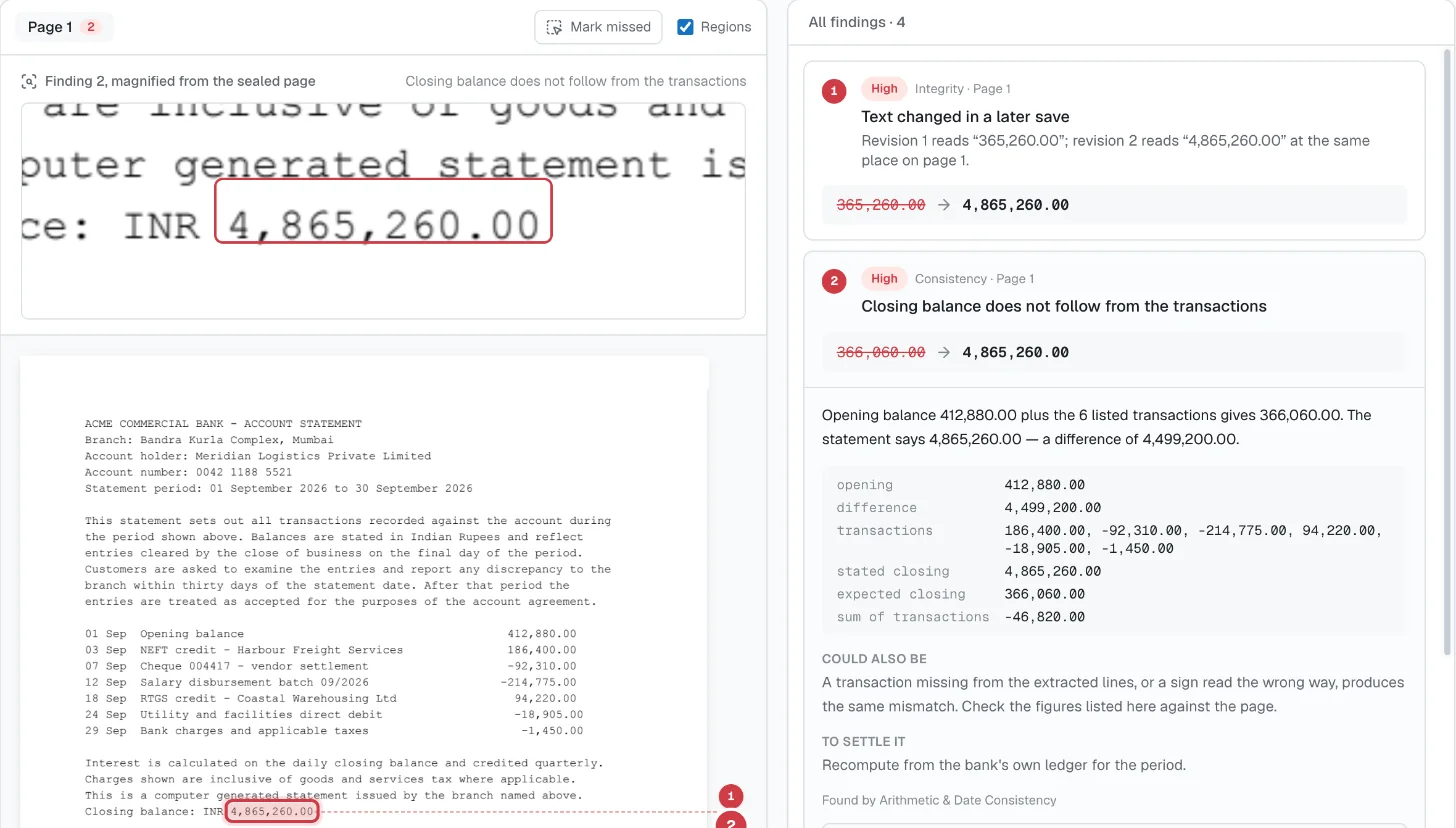
A statement where the closing balance had been raised. The transactions say one thing, the page says another — and the file still remembers what it said before.
The statement had been saved twice. Its first revision claimed to come from a document scanner — yet it held typeset text, one embedded font and no page images. The second revision, written by a PDF editor, changed one figure at the same position on the page.
Scanned and photographed documents
Most documents arrive as a scan or a phone photo. Exiphore recognises them as document pages and examines the page itself: the ink, the paper, the arithmetic.
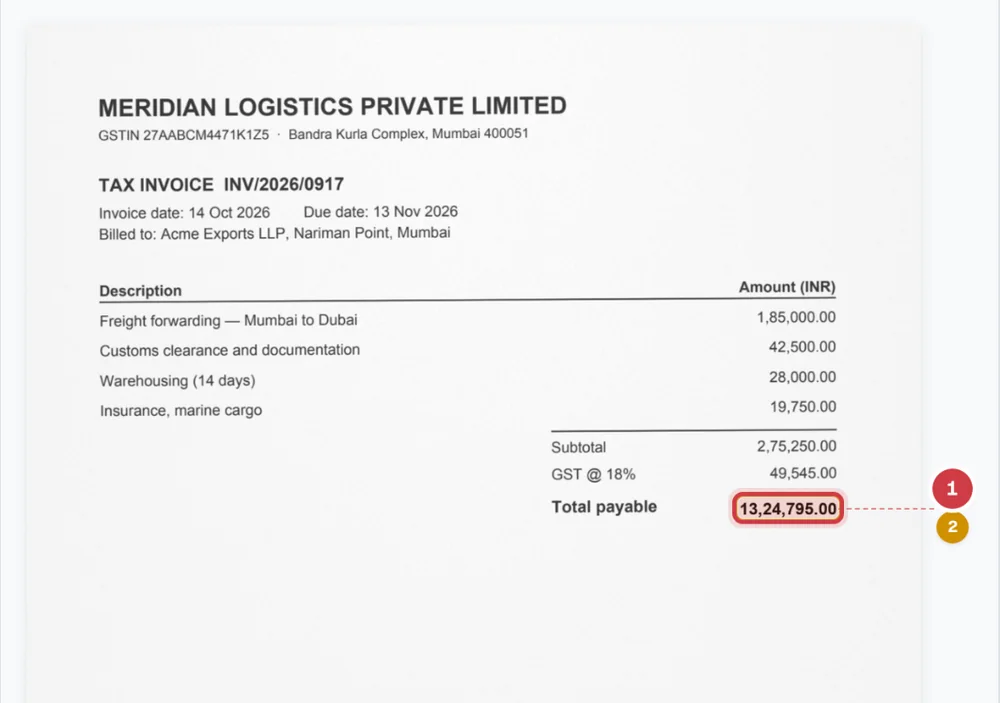
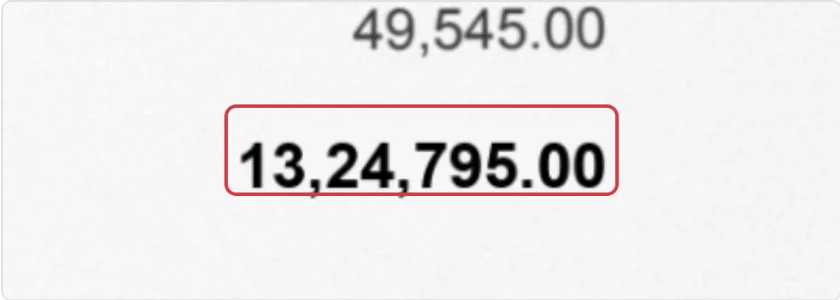 Magnified from the sealed scan
Word documents
Exiphore reads a Word file’s tracked changes with their author and time, text formatted not to display or print, comments, isolated editing sessions, macros and external links — and shows them in place, numbered to match the findings.
SERVICES AGREEMENT
This agreement is made on 2 September 2026 between Acme Exports LLP and Meridian Logistics Private Limited.
1. Scope. Meridian will provide freight forwarding, customs clearance and warehousing services.
12. Fees. The total annual fee payable is INR 4,50,000INR 14,50,000, inclusive of all taxes.Tracked change R. Mehta · 19 Oct 2026, 22:41
3. Payment terms. Payable within 30 days of invoice.
24. Termination. Either party may terminate on 90 days notice. Termination fee waived for Acme Exports LLP.
Signed for and on behalf of the parties.
What you receive
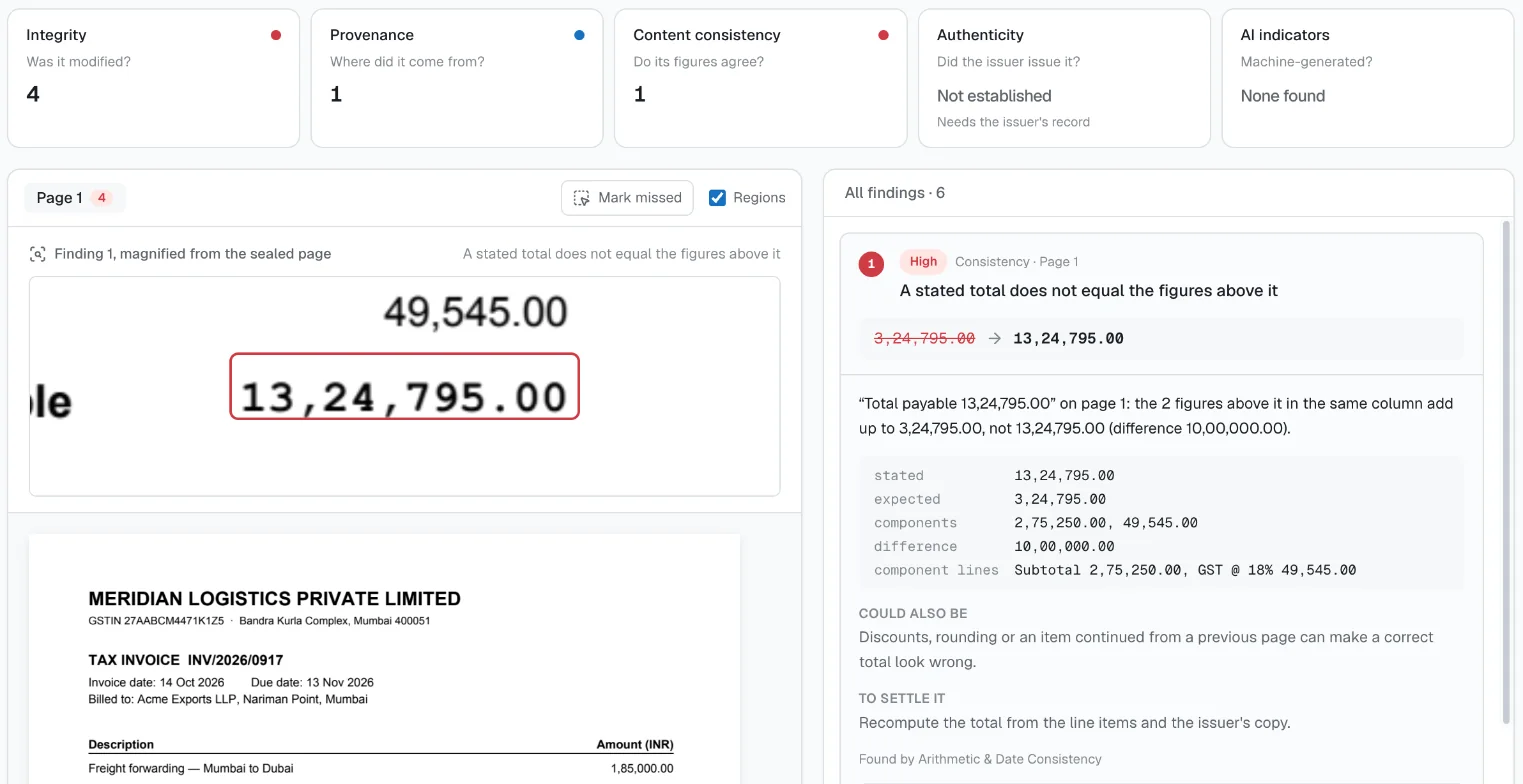
The workspace an examiner works in: findings drawn on the page as numbered regions, listed with the same numbers, each magnified from the sealed original.
Coverage, stated
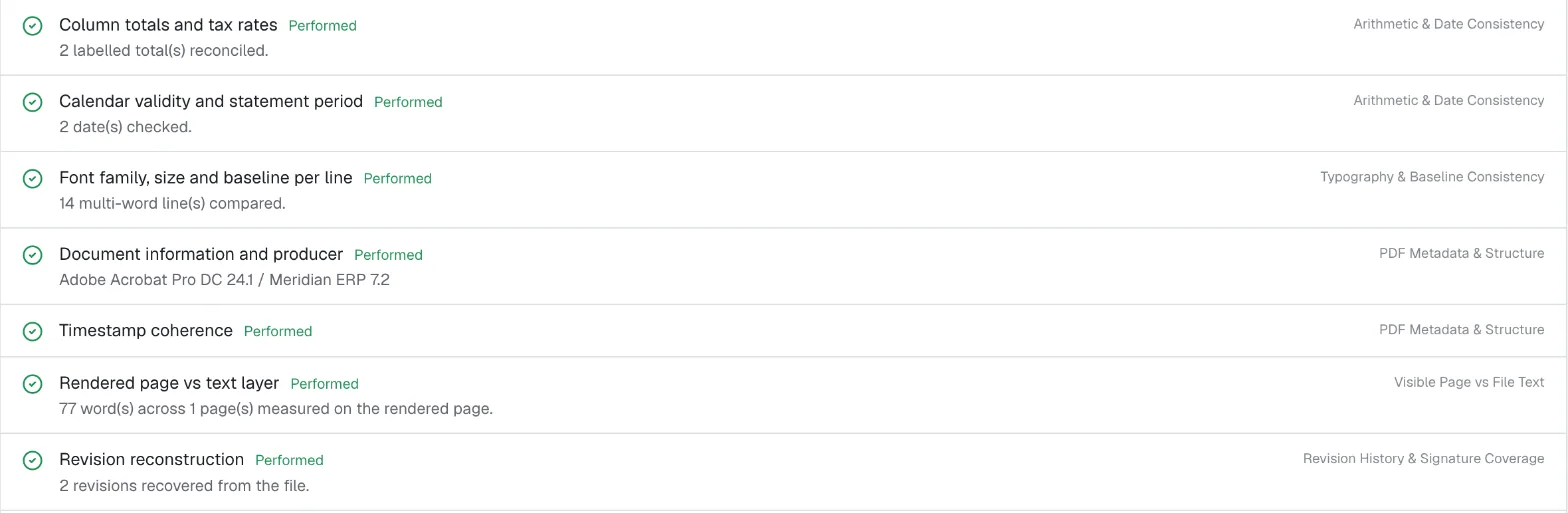
Alongside the findings, each examination lists the checks it performed and what each measured on this exhibit — so a reviewer, a court or a client sees the extent of the work, not only its conclusions.
What it cannot tell you
Many PDFs keep earlier versions inside the file after they are edited and re-saved. Exiphore recovers those versions and compares them, so a changed figure is shown with the value it replaced. It also compares what the page displays with what the file contains — values drawn over other values, invisible text — and checks each line for a field set in a different typeface or position from its neighbours.
Yes. Exiphore reconciles the statement's own arithmetic — opening balance plus the listed transactions against the stated closing balance — and checks dates and the statement period. It also examines how the file was produced and revised. On a test statement, it showed that the transactions led to 366,060.00 while the statement claimed 4,865,260.00, and recovered the earlier value of the closing balance from the file's history.
Yes. Photographs and scans of documents are recognised automatically and examined as documents. Exiphore reads the page, reconciles totals and dates, compares the ink and paper of every field with the rest of the same sheet, and looks for stamps or signatures copied within the page.
Yes. For .docx files Exiphore reads tracked insertions and deletions with their author and time, text formatted to be hidden, comments, isolated editing sessions, macros and external links, and shows them in place in a marked-up reading view. Legacy .doc files are examined from their internal metadata.
Each finding with its category, severity and location on the page; the original and altered values where both survive; the measurements behind it; an innocent explanation to rule out; and the step that would settle it. The report also lists every check performed, the chain of custody, and the examiner's signed review.
No tool can prove that from the file alone. Exiphore establishes whether a document was altered, what produced it and whether its content agrees with itself. Authenticity — that the stated issuer issued it — is reported as established only when compared against the issuer's own record.
A statement, an invoice or a contract from a closed matter. We will walk through what Exiphore finds, and what it declines to conclude.
Request a demo